The homepage
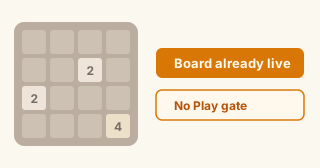
The board is already live. No “Play” gate.
Plenty of clones make you click through a banner, wait on a download nudge, or dump you into a wall of unrelated thumbnails. Here the classic 4×4 grid is the homepage. Score and Best sit above it. Hint, Watch demo, Daily challenge, Undo, and New game sit under it. If you only wanted one round before a call starts, you are already sliding tiles — no signup, no install package.
Play2048Base is a single-game site. One domain, one puzzle family. Your Best score stays in this browser. We are not an app-store listing and not a multiplayer lobby.
Why the site exists: we got tired of “free 2048” pages that bury the board under ads, store CTAs, or a grid of unrelated games. So this tab opens on a playable classic board, keeps guides on the same domain, and puts Hint reasons next to the tiles instead of a silent arrow.
Who this is for
Commute filler, practice rounds, stubborn high-score nights.
Some people open a tab between meetings and leave after a few merges. Others come back when a corner habit is finally clicking and they want a clean board without accounts. Phone players swipe; desktop players mash arrow keys. Same engine either way.
- Five quiet minutes. Open the tab, take a few merges, close it. No profile setup.
- Still learning the rules. Use the board above first, then skim the how-to guide for controls and first moves.
- Chasing a higher score. When you care about corner habits and not vibes, jump to strategy notes or how to reach 2048. Those pages keep a live board too.
How merges work
One slide moves every tile in that direction.
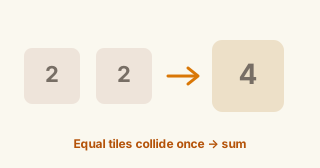
You pick up, down, left, or right. Every tile slides as far as it can. Two equal numbers that collide merge once into their sum — 2+2 becomes 4, 4+4 becomes 8, and so on. A tile cannot merge twice in the same move, so the order inside a row matters as much as the values.
After a move that actually changes the board, a new 2 (sometimes a 4) appears in an empty cell. Moves that change nothing do not spawn a tile. Game over when no slide can change the grid. The classic goal is a 2048 tile; you can keep merging for score after that if you want.
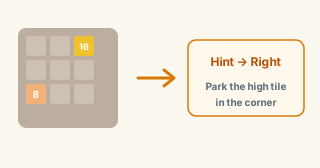
Crowded boards punish sloppy slides. Leaving a little working space — and parking your max tile in a corner — is the advice tip pages keep repeating. We put that advice next to a live board, not instead of one.
Controls
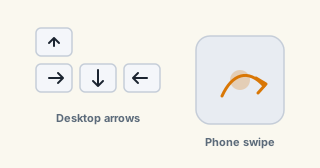
Arrow keys on desk. Swipe on phone.
- 01
Move. Desktop: arrow keys (focus the page, not the address bar). Mobile: swipe the board. Touch works in a normal browser tab — no Flash leftover.
- 02
Merge. Equal tiles that meet become one higher tile. Watch Score tick; Best keeps your local high watermark for this browser.
- 03
Reset or practice. New game clears the run. Undo steps back one mis-swipe when you want to compare lines. Daily challenge locks a fixed board for the calendar day on this device.
Hints that say why
An arrow without a reason is just noise.
Plenty of clones slap an “AI” label on a button that flashes a direction and nothing else. Ours returns a direction plus a short English line under the board — keep the high tile parked, open a merge you were about to miss, that kind of thing. Wrong sometimes? Yes. Useful when you are learning? That is the point. Hint does not upload your board to a coaching server; the logic runs in your browser.
Watch demo plays a short auto-run so you can see merges resolve, then you take the controls back. It is a teaching loop, not a bot farming your high score for a leaderboard we do not run.
More ways to play
Classic 4×4 here. Variants and guides one click away.
This page is the standard 4×4 board. When it feels tight, try a wider 5×5 grid, mid-size 6×6, or the large 8×8 board. Want a tiny warm-up? 3×3. Night glare? Dark mode keeps classic tiles on a dim desk. When you want a safety net while you practice patterns, open the undo practice page.
Prefer reading before mashing? Start with what the game is, rules and first moves, then corner habits, a short tips list, how to get the 2048 tile, or how to beat it. Chasing numbers after the first clear? Local Best stays on this device. Filter wording only: unblocked — one board, no portal.
Boundaries
What you get — and what we skip.
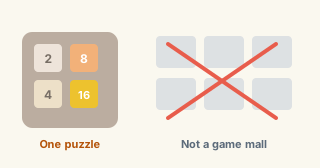
You get instant play, a local Best score, explainable hints, a short demo, a daily target, and undo. You do not get a global account, real-time multiplayer, cracked APKs, or a directory of fifty unrelated game thumbnails. School filters and “unblocked” malls are someone else’s product. This stays a single puzzle in a normal browser tab.
Sudoku, Snake, chess — those belong on other domains. Skin packs, Pokémon themes, and cheat injectors are out of scope here.
Common questions
Short answers, real edges.
What is Play2048Base?+
A free browser puzzle you can open and play immediately — hints, demo, daily challenge, and undo included. Not an app-store download page. Not a multi-game portal.
Do I need to click Play first?+
No. The 4×4 board on this page is already active. Arrow keys or a swipe start the run.
Phone or desktop — same board?+
Yes. Phone: swipe. Desktop: arrow keys with the page focused. Same merge rules; Best stays in that browser. Longer walkthrough on the how-to page.
What happens when I reach the 2048 tile?+
You clear the classic goal. You can keep going for 4096 and beyond if the board still has moves. For habits that get you there more often, see the beat guide.
Do hints upload my board?+
Hint and demo are built to run locally in the browser (Web Worker). Treat it like any offline-capable web game — we are not a cloud save platform and we do not run a public leaderboard account system.
Is there a daily challenge?+
Yes. Tap Daily challenge for a fixed board tied to the local calendar day on this device. Progress markers stay local. No social brag feed.
Can I undo a move?+
Yes — Undo reverses the last slide so you can compare lines. Prefer a calmer practice framing? Use the undo page; same control.
Do you host other games here?+
No. One puzzle family, one domain. No APK mirrors, no cheat injectors, no fifty-thumbnail games hub.
Is this a download or Flash game?+
Neither. It runs in the browser — no Flash, no store install required to start. Optional PWA install pins a shortcut; the board still works in the tab without it.
How to play
Rules, keys, swipe, and first merges — board still on the page.
Strategy
Corner habits and high-score patterns, not vibes.
How to beat it
Reach the top tile without rage-quitting every bad spawn.
5×5 · 6×6 · 8×8 · 3×3 · Undo · Dark
Grid sizes, dark chrome, or practice with a safety net.
Play 2048 · Online · Free · Tips · High score · Unblocked · What is · Get tile
Short landings for search intent — board still live.
Practice and classic merge rules only. Your score is local to this browser. Take breaks. Not a school-filter bypass product, not financial or medical advice — just a sliding puzzle.